Workflow automation
Replace repetitive copying, formatting and calculations with dependable automated steps.
- Recurring task automation
- Data validation and clean-up
- Connected worksheets
Excel & Google Sheets specialist
If your team is repeatedly copying data, rebuilding reports or fixing the same spreadsheet problems, I can help simplify the process.
Services
I work with the files and processes you already use, improving them without adding unnecessary software.
Replace repetitive copying, formatting and calculations with dependable automated steps.
Turn scattered data into clear dashboards and reports that update with less effort.
Build a structured tool for the way your business actually operates.
Example solutions
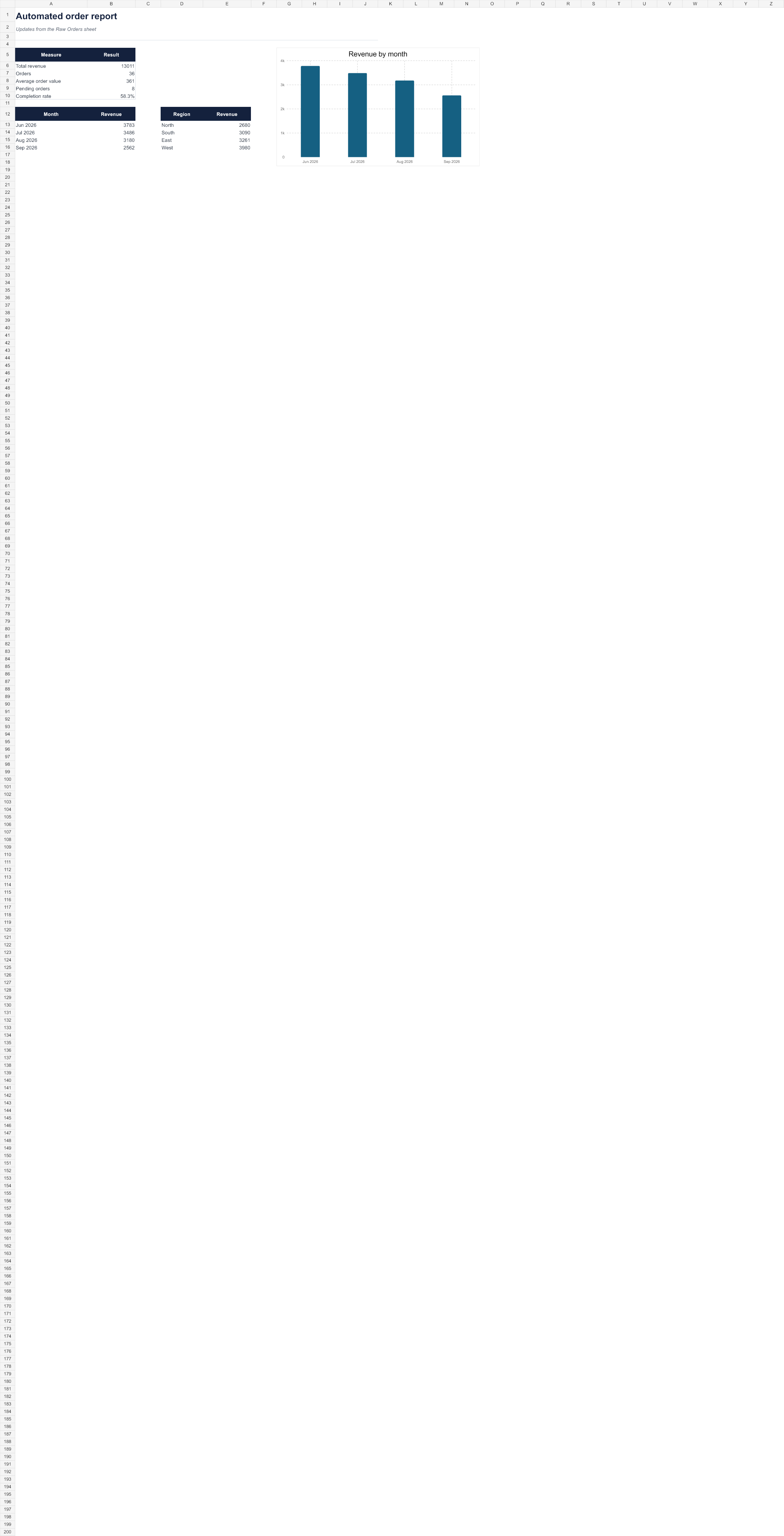
This example uses fictional order data. It demonstrates the type of repeatable workflow I can adapt to a real business process.
Illustrative workflow
New rows are added to one structured table. Checks identify incomplete information, calculations update automatically and the report presents the figures needed for review.
Keep information in a consistent, structured table.
Flag missing values and apply the same rules every time.
See the current totals without rebuilding the summary.
What we improve
The aim is not automation for its own sake. It is a file that takes less time to maintain and is easier to trust.
Reduce the repetitive work that slows down your day.
Use consistent processes, checks and formulas you can trust.
Bring the right numbers together in a clear, useful view.
Receive a documented system that your team understands.
A straightforward process
We discuss the task, the people involved and what a better result looks like.
You receive a clear outline of the proposed solution, timescale and cost.
The solution is created, checked against real scenarios and refined with you.
You receive the finished system with clear guidance on how to use it.
“You will deal directly with me from the first conversation through to the final handover.”
About RowBright
I’m Leighton Ford, and I run RowBright. I help small businesses improve Excel and Google Sheets files that have become repetitive, difficult to maintain or too dependent on one person.
I start by understanding how the work is actually done. The finished system is tested, documented and handed over clearly—without turning a straightforward problem into an oversized software project.
Common questions
Yes. Existing files can be reviewed, tidied and automated without necessarily rebuilding everything from scratch.
Usually not. Solutions are designed around Excel or Google Sheets and the tools you already use wherever practical.
Yes. Clear handover guidance is included, so you understand the workflow and are not left with a black box.
That depends on the process and complexity. After an initial conversation, you will receive a clear scope and price before work begins.
I aim to respond to new enquiries within one working day.
I will agree what information is needed before work begins and use sample or anonymised data wherever practical. Your files will not be shared or reused as public examples without your permission.
Start a conversation
Tell me about the repetitive task, report or spreadsheet that is taking too much of your time.